Original by Simon Lockyer · . The worked examples and guidance above the original text are a new editorial edition from 20 October 2026.
em and rem, without the guesswork
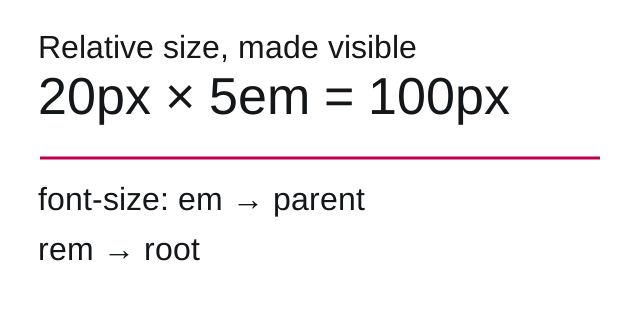
Use em when a component should scale with its own text. Use rem when spacing should follow the root text size. For font-size, em refers to the parent’s computed font size; on most other properties it refers to the element’s own computed font size. This distinction explains many unexpected nested sizes.
Convert a pixel measurement to em
Work through one component
- A card inherits a 20px font size.
- Give it
padding: 1em: that padding is 20px. - Inside the card, a heading uses
font-size: 1.5em: the heading is 30px. - If that heading also uses
margin-bottom: 1em, the margin is 30px, not 20px.
.card { font-size: 1.25rem; padding: 1em; }
.card h2 { font-size: 1.5em; margin-block-end: 1em; }
With a 16px root, the card is 20px and the heading is 30px. A nested heading does not use the root for its em calculation. A rem-based margin would.
Check it before shipping
- Change your browser’s default font size and check that content still fits.
- Inspect computed styles for the actual font size instead of assuming 16px.
- Zoom to 200% and try the longest real heading.
- Prefer unitless line height for inherited text rhythm.
Reference: MDN: CSS length units. Editorial example checked 20 October 2026.
Read the original 2013 article
Most web designers and web developers have relied for years on pixel values. I for one didn’t really know allot about using em values. This article will hopefully try to explain what em units are and how you could use them in your projects.
What exactly is an em value?
Formal definition from of the unit
So if we have set the font size of an h1 element to 20px and then we used the following code:
H1{
	font-size: 20px;
	line-height: 1.2em;
}
this would set the line height to 20% bigger than the font size set. So it would be 24px high.
But what if you don’t set the size of your font? Generally in your CSS tree you will have set font size’s at some point, I don’t really see how you cant! But if no font size has been set the size on an em unit will result to 16px.
The only way you can learn is by doing! So lets try one more.
Say we have a div with a font size set to 20px how would you go about setting the width and the height of the div to be the same as 100px? Well 100 / 20 = 5 so you would set the height and the width of the div to be 5em like so:
.div {
    font-size: 20px;
    width: 5em;
    height: 5em;
}
A little tip – comments
Recently I have completed some work in collaboration with some other web designers and developers. To be polite the codes comments were particularly light. Its not really that necessary to comment CSS code quite as much as if you were writing in PHP or C# however in the case of using em it is really helpful. For the example above I like to comment like the example below. This really helps after a while to get your head round em units and you will be grateful when you go back to look at your CSS file in a few months time!
.div {
    font-size: 20px;
    width: 5em; /* 100px / 20px = 5em */
    height: 5em; /* 100px / 20px = 5em */
}
Round up
I found it quite hard to get into the habit of using em units after using pixels for such a long time. However the new releases of the popular css frameworks, Foundation.Zurb and Bootstrap include the use of em units.
While current trends in web design make use of responsive layouts I believe the use of pixels and percentages are necessary for setting container sizes etc. However the use of em units become useful when setting sizes in relation to fonts.
Original archived capture. Historical prices, donation requests, browser workarounds and external links are retained as context, not current offers.