Original by Simon Lockyer · . The worked examples and guidance above the original text are a new editorial edition from 20 October 2026.
A footer that follows the content
A sticky footer sits at the bottom of a short page and moves below longer content. It is different from position: fixed, which can cover the page while you scroll. The original negative-margin technique is preserved below; a three-row grid is easier to maintain when the footer changes height.
Try a short and a longer page
Use natural row heights
body {
  margin: 0;
  min-height: 100vh;
  min-height: 100dvh;
  display: grid;
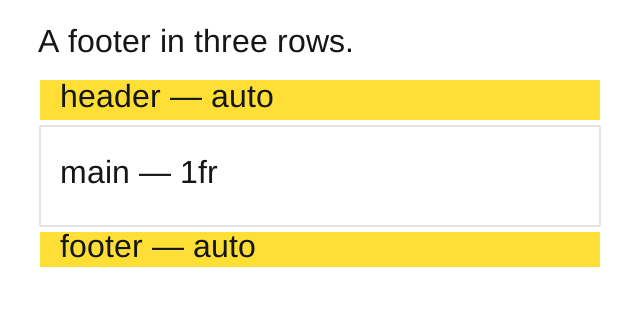
  grid-template-rows: auto 1fr auto;
}
/* Direct children: header, main, footer */
The header and footer use the space their content needs. The middle row fills what remains. When the main content grows, the document grows with it. The first min-height is a fallback; supporting browsers use the dynamic viewport unit declared afterwards.
Acceptance checks
- Use one paragraph. The footer should reach the bottom of the viewport.
- Use ten paragraphs. The footer should appear after the last paragraph without covering it.
- Double the footer text and zoom to 200%. No manual height should need updating.
- Check a phone with its browser controls visible and collapsed.
If a wrapper, rather than the body, owns the three regions, apply the grid to that wrapper. Extra wrapper elements change which boxes become grid rows.
Reference: MDN: sticky footers. Editorial implementation, 20 October 2026.
Read the original 2013 article
Many times have I seen a beautifully designed website that is pixel perfect until you stumble on a page that doesn’t have quite enough content on the page. As a result the footer is sitting in the center of the page, it just looks silly and out of place. There have been many versions of this code circulating on the internet but this is the one I use on almost all of my projects to make sure those pesky footers stay at the bottom where they belong.
HTML
<div id="wrap">

    <div id="header">

    </div>

    <div id="main">

    </div>

</div>

<div id="footer">

</div>
CSS
The following CSS really doesn’t need to much explaining its quite easy. The only thing you will need to change is the padding on the main div and the height of the footer div. This should be set to whatever height your footer is at the moment, but make the values match or it wont work.
html, body {height: 100%;}

#wrap {min-height: 100%;}

#main {overflow:auto;
    padding-bottom: 150px;}  /* must be same height as the footer */

#footer {position: relative;
    margin-top: -150px; /* negative value of footer height */
    height: 150px;
    clear:both;}

/*Opera Fix*/
body:before {
    content:"";
    height:100%;
    float:left;
    width:0;
    margin-top:-32767px;/
}
IE Fix
As always IE isn’t very happy with that code. We just need to change the style formatting on the wrap div and everything should work great.
<!--[if !IE 7]>
    <style type="text/css">
        #wrap {display:table;height:100%}
    </style>
<![endif]-->
I haven’t included a download of the project but if anyone would like it I can always add a link just drop me a message.
Original archived capture. Historical prices, donation requests, browser workarounds and external links are retained as context, not current offers.